
As AI advances, tools like Claude AI promise to make app development more accessible than ever. As someone with no prior coding experience, I was curious and wanted to put Claude AI to the test. If I enter any tracking ID, Claude AI should track my package. It would then give me a simplified delivery milestone, like picked, out for delivery, delivered, etc.
But, first… What’s Claude?
Claude AI is an advanced chatbot developed by Anthropic, a company founded by former OpenAI employees. Cool, so they know their shit for sure : ). It leverages Natural Language processing (NLP) and other AI core technologies. It generates human-like text responses, engages in conversations, and performs a wide range of tasks. It is perfect at answering questions, generating content, analyzing data, and even writing and debugging code. Claude 3.7 Sonnet is the most recent and advanced model as of March 2025. Many other Apps, like Cursor AI, use Claude AI’s model as their default.
Here’s an honest review of my experience—the good, the bad, and whether it’s truly as easy as it seems.
The Test: A Universal Package Tracking App
The idea was simple. Create an app where users could enter any tracking number from any courier (such as UPS, FedEx, USPS, DHL, etc.) and get a status of where the package is. Normally, building such an app would require coding knowledge, API integrations, and debugging skills. But with Claude AI, I was hoping to sidestep most of that complexity. Keeping in mind I have no knowledge of Python, how to install etc.
The Prompt
I started with one prompt. Then, at each step, I asked Claude to give me more details on how to do it. The first prompt I started with was :
“for MAC OS, give me step-by-step instructions on building an app that tracks any tracking number via AI & Python. User should give any tracking number, App should look for a website to track it, and then suggest the delivery milestone.”
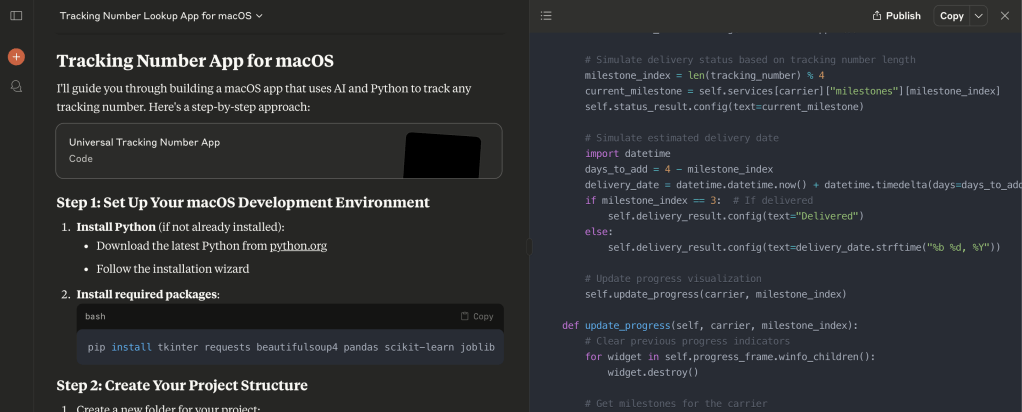
The Good: It truly did the magic!!!
Semi-Functional App with Minimal Effort
Claude AI was surprisingly capable of generating a basic app structure. By simply describing the functionality I wanted, it provided me with Python-based code that included a user interface. This may save anyone a ton of time, as you already get a skeletal structure in minutes.
No Prior Coding Experience Required (Kind of…)
While I still had to deal with some technicalities, Claude AI did a great job of explaining its outputs in a way that made sense to a non-coder. If I didn’t understand something, I could ask for a breakdown in simpler terms. This lowered the entry barrier significantly compared to traditional coding. Just like a good developer, it commented everything in the code itself.
Get your prototype or MVP in minutes
If you’re looking to build a quick prototype or experiment with an idea, Claude AI can generate code almost instantly. This allows for rapid iteration and testing without having to spend days. Gives you no excuse to procrastinate. As it has already generated the code for you in minutes.
Free Brainstorming and Conceptualization partner
Even if you don’t plan to develop a fully functional app, Claude AI is great for brainstorming and generating rough drafts. This is useful for entrepreneurs and product managers who want to visualize an idea before hiring developers.
The “What can be better” : Its not perfect!!!
Claude generated code can’t be sold or used for commercial purposes
According to Anthropic’s Terms of Service, users are granted a limited license to use Claude’s outputs, including generated code, for internal and non-commercial purposes. These terms and conditions keep changing, so you should know the implications before using this commercial. With substantial modifications, you can still use the code commercially.
Debugging Can Be a Nightmare
When the AI-generated code didn’t work as expected, debugging became a major challenge. Since I lacked deeper coding knowledge, I often found myself stuck, unable to figure out why a certain function wasn’t behaving correctly. This can be time consuming, as you will have to learn more about the structure of the code to debug.
Syntax & Stack Overflow Still Needed
Despite AI’s help, I still had to look up common syntax rules, error messages, and fixes on platforms like Stack Overflow. AI-generated code isn’t immune to common bugs, and at times, I had to manually tweak the output to make it work properly or asthletically better .
Not Production-Ready
This is definitely not something ready to launch or close to even a Minimal Viable Product(MVP). The AI-generated app was a good starting point but not something I could release without extensive modification. It is a skeleton code, just something to start with, too far from the final application.
Final Verdict: A Helpful But Not Perfect Tool
Claude AI is a great asset for non-coders who want to dip their toes into app development. It simplifies the process significantly and can generate a semi-functional app with minimal effort. However, it’s not a magic bullet—debugging, syntax knowledge, and external resources like Stack Overflow are still essential. However, if you’re completely new to coding and want to experiment, Claude AI is a fantastic starting point.
Would I use it again? Absolutely—but with the understanding that it’s a tool to assist, not replace, traditional coding knowledge. In future, once it’s more sophisticated, it maybe my permanent coding assistant, just not yet.
Have you used Claude AI to code for you? What other apps you have used? Let us know in the comments section!





 A Beautiful World!